Behaviours
The recommended “high-level” implementation of a BCI Essentials front end is provided by a suite of Monobehaviour scripts. Stimulus trials and the Training routines which use them are implemented as discrete components, easily replaced or extended with alternative implementations.
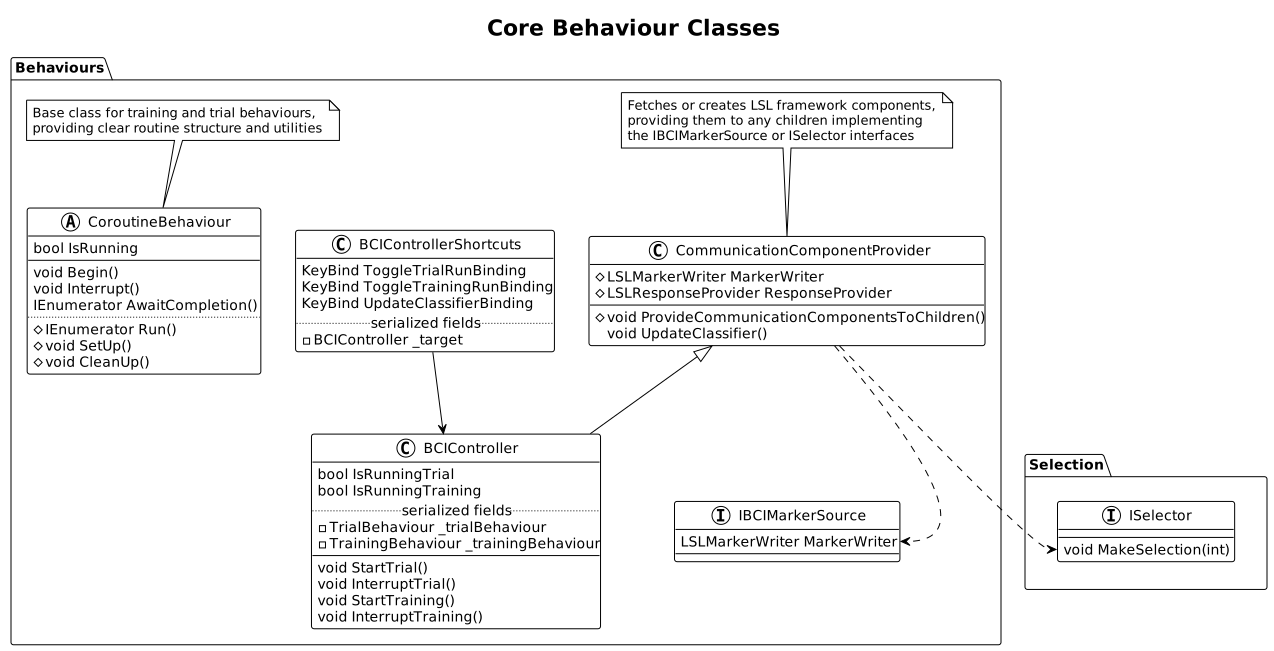
BCI Controller
Though not required, this utility class may provide a more comfortable interface with system functionality for many developers. Core behaviour triggers of a referenced training and trial behaviour are provided in one place.
Also serves as a CommunicationComponentProvider.
Communication Component Provider
Simplifies the establishment of system communication. On Awake(), core LSL framework classes will be found or created, then provided to any components on the same game object (or it’s children) which implement designated “communication-user” interfaces.
I Marker Source
Implemented by classes needing to send markers to the back end using an MarkerWriter. Reference will be assigned directly by a parent or sibling CommunicationComponentProvider.
I Prediction Sink
Implemented by classes using predictions, whose relevant method will be hooked into predictions by a parent or sibling CommunicationComponentProvider.
See Selection for more details.
BCI Controller Shortcuts
A debug/input bypass helper providing a set of keyboard shortcuts to trigger methods on a BCIController, invoking it’s referenced training or trial behaviour. Bindings are configurable in the Unity Inspector.
Underlying Classes
These classes provide skeletal functionality used by a number of behaviours.
Coroutine Behaviour
Wraps an abstract Run coroutine as the core logical sequence implemented by any extended classes with a number of utilities like status tracking, interruption, and virtual methods triggered at the start and end of a run. Base for training and trial behaviours.
Overriding the Run method allows you to schedule actions delayed by any Unity coroutine enumerator like WaitForSeconds. This includes any other custom Enumerator method.
SetUp and CleanUp can implement arbitrary actions triggered before and after any run, even if interrupted.
MonoBehaviour Using Extended Attributes
Functionally identical to a MonoBehaviour, this class triggers the use of a custom Unity inspector supporting additional property attributes:
// available anywhere
[InspectorReadOnly]
[DisplayName]

// extended attributes
[StartFoldoutGroup(string)]
[EndFoldoutGroup]
[AppendToFoldoutGroup(string)]
[ShowIf(string | string, int[])]